Are you searching in the market for one budget-friendly HP laptop which is having up-to-date hardware and modern specs, but the build is no-frills type? Then please come and see the HP Professional 14 and HP 15 laptops.
These two laptops are looking quite same, so let us hit only the highlights and understand what things you are needing to know about these machines.
Some links in this post are affiliate links of Amazon India. As an Amazon Associate, I earn from qualifying purchases. It means, if you click on my link and buy any product, I can get small commission from Amazon, and there is no any extra cost for you.


What’s Different?
If we see from high level, the main differences between these two laptops are coming down to only some (relatively) notable specs.
- RAM: The HP Professional 14 is coming with 16 GB DDR4-3200 RAM, but the HP 15 is coming with only 8 GB DDR4-3200 RAM.
- Display Size: The HP Professional 14 is having a 14-inch FHD IPS display at 300 nits brightness, while the HP 15 is having a bigger 15.6-inch FHD display but only at 250 nits brightness.
- Operating System: The HP Professional 14 is shipping with Windows 11 Pro, but the HP 15 is shipping with Windows 11 Home.
- USB-C Capability: The USB-C port of HP Professional 14 is supporting Power Delivery and also DisplayPort 1.4 output, but the USB-C port of HP 15 is supporting the data transfer only.
- Extras: The HP Professional 14 is including one fingerprint reader and MSO 2024. The HP 15 is including MS Office Home 2024, one 1-year Microsoft 365 Basic subscription, and also a privacy shutter on top of the webcam.
What’s the Same?
Other than the differences which are listed above, these two HP laptops are sharing a lot of common ground. They are having the same:
- Processor: Intel Core 5-120U (10 cores, 12 threads)
- Storage: 512 GB PCIe NVMe M.2 SSD
- RAM Type: DDR4-3200
- Resolution: 1920 × 1080 (FHD)
- Graphics: Intel Integrated
- Wifi: Realtek Wi-Fi 6 (2×2)
- Keyboard: Full-size, backlit
- Battery: 3-cell, 41 Wh Li-ion polymer
Design
The design of both these HP laptops is based on one clamshell body style with silver finish, anti-glare display coating, and one slim profile which is built for the portability.
Key design elements which both are sharing include:
- Backlit Keyboard
- Anti-Glare Display
- Webcam: HP True Vision 1080p FHD camera with integrated dual array digital microphones

The HP Professional 14 is weighing around 1.4 kg (as tested) with the dimensions of 30 × 22 × 5 cm, which is making it the more compact option.
Also it includes built-in fingerprint reader for the secure biometric login.

The HP 15, on the other side, is weighing 1.59 kg with dimensions of 36 × 23.6 × 1.9 cm. It is having a larger footprint because of the 15.6-inch screen, and it is including one numeric keypad on the keyboard also, which is a nice touch for the data entry and number crunching work.
Both laptops are shipping in silver colourway and they are carrying one clean, professional look which is suitable for office and everyday use.
Display
When we do comparison of HP Professional 14 vs. HP 15, the display is becoming one big point of difference. The screen which you are looking whole day is mattering a lot, and these two models are taking bit different way for this.


The HP Professional 14 is having a 14-inch FHD IPS panel with 300 nits brightness and 45% NTSC color gamut. Because of the IPS technology, the colors are staying consistent and the viewing angles are also very wide from all sides.
The HP 15 is coming with 15.6-inch FHD display having micro-edge bezels, 250 nits of brightness and same 45% NTSC color gamut. This bigger screen is giving more space for doing multitasking, spreadsheets work and also entertainment purpose.
So finally it is depending on your own preference: either a brighter and more compact IPS panel on Professional 14, or one larger and more immersive screen on the HP 15. But we must remember, the display size is not always giving equal productivity, because resolution, brightness and color accuracy are also playing their role here.
Processor & Performance
Both of these laptops are sharing the same Intel Core 5-120U processor, which is using 10-core, 12-thread architecture with 12 MB L3 cache, so the multitasking and daily productivity work is going smooth.
- HP Professional 14: Up to 5.0 GHz (Intel Turbo Boost)
- HP 15: Up to 4.6 GHz (Intel Turbo Boost)
Here the HP Professional 14 is going slightly ahead with higher maximum turbo clock of 5.0 GHz, comparing to 4.6 GHz on the HP 15. In the testing, it shows this gap is small only, but it can be visible during those short but heavy tasks like code compiling or opening one big spreadsheet.
More important point is, the HP Professional 14 is coming with 16 GB RAM, but the HP 15 is having only 8 GB. For the users who are daily running many browser tabs, office apps and video calls together at same time, this extra memory is making one clear difference.
Battery Life
Both laptops are running on a 3-cell, 41 Wh Li-ion polymer battery.
HP Professional 14
~5 Hours
HP 15
~7 Hours 45 Minutes
In battery side, the HP 15 is having clear upper hand, because it is lasting up to 7 hours and 45 minutes in single charge, whereas the HP Professional 14 is giving around 5 hours only. The HP 15 is also supporting fast charging, and it is reaching near about 50% in just 45 minutes time.
The HP Professional 14 is using one HP Smart 65W External AC adapter, which is doing efficient charging, but it is not advertising any fast charge feature. But one thing we should keep in mind, the actual battery timing will always change according to workload, brightness setting and which applications are running in background.
Which one is better, the HP Professional 14 or the HP 15?
The HP Professional 14 is coming with more premium specifications than HP 15, but for this you must pay the higher price also. As one example, the Professional 14 is having 16 GB RAM inside, but the HP 15 has only 8 GB, which is the half.
The Professional 14 also comes together with Windows 11 Pro and one fingerprint reader for the security. The HP 15 does not include the fingerprint reader, however it is coming bundled with 1-year Microsoft 365 Basic subscription, the MS Office Home 2024, and also one webcam privacy shutter for protecting your camera.
Everyday Performance
When we are looking on the everyday performance, again there is having a lot of overlapping between them. So what are the main factors which are affecting the real-world performance? Mostly it is these four things:
- Processor
- RAM
- Storage speed
- Thermals
With both the HP Professional 14 and the HP 15, the processor and the storage are same and identical, so because of this you can expect that the baseline computing performance will be matched very closely between two machines.
The one key differentiator here is the RAM. The HP Professional 14, because it is having 16 GB, will be handling the heavier workloads in more comfortable way. Below I am breaking down how this is happening in the typical use cases.
Light Productivity
- Web browsing
- Document editing
HP Professional 14
95
HP 15
88
Both of these laptops are doing the light productivity works very easily without any struggle. The Intel Core 5-120U processor and the SSD type storage they are giving that snappy feeling of speed, so for everyday office kind of work the response is very quick and smooth.
Multitasking
- Multiple browser tabs
- Coding
- Light Video Editing
- Office apps in same time
HP Professional 14
85
HP 15
80
The 16 GB RAM which is coming in the Professional 14 is giving it that extra breathing space for the heavy multitasking situation. But the HP 15 with only 8 GB RAM, it can start feeling the pressure when you are opening 20+ browser tabs and one video call is also running together at same moment.
Media Consumption
- Streaming
- Video playback
- Casual entertainment
HP Professional 14
90
HP 15
95
Both laptops are giving that smooth 1080p playback because of their FHD displays and the integrated Intel graphics inside. But the HP 15 with its bigger 15.6-inch screen size, it is becoming more enjoyable for the media watching experience.
Business & Professional Use
- Enterprise apps
- Remote desktop
- Secure login
HP Professional 14
90
HP 15
80
The Professional 14 is basically made for the business purpose only, because it is having Windows 11 Pro, one fingerprint reader, and also USB-C with Power Delivery plus DisplayPort output facility. On the other side the HP 15 is coming with Windows 11 Home, which is missing some of the enterprise type features like the BitLocker and the Group Policy.
Final Verdict: For the business peoples and power users who are needing more RAM and those professional-grade features, the HP Professional 14 is standing as the stronger choice. But for the students and normal general users who are giving more value to the screen size and battery life in a lower price, the HP 15 is delivering the excellent value for money.
Connectivity & Ports
Both laptops are offering one solid collection of ports and also wireless connectivity for the daily day-to-day usage.
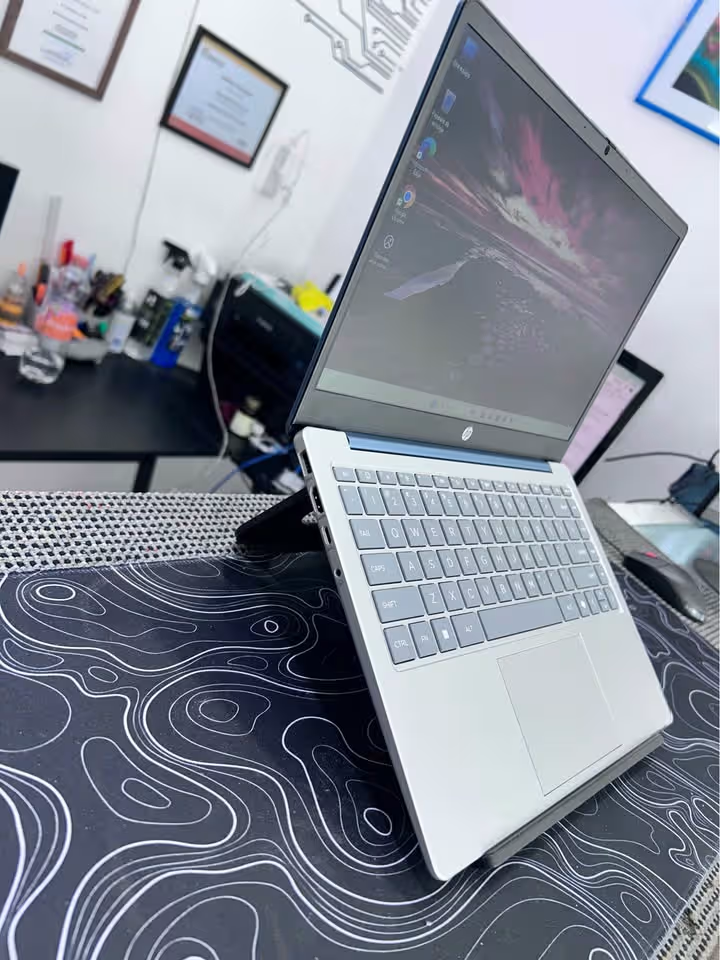

HP Professional 14
- 1 × USB-C 10Gbps (Power Delivery & DisplayPort 1.4)
- 2 × USB-A
- 1 × HDMI 1.4b
- 1 × AC Power
- 1 × Headphone/Mic Combo
- Wi-Fi 6 (2×2) + Bluetooth 5.4


HP 15
- 1 × USB-C 5Gbps (data only)
- 2 × USB-A 5Gbps
- 1 × HDMI 1.4b
- 1 × AC Smart Pin
- 1 × Headphone/Mic Combo
- Wi-Fi 6 (2×2) + Bluetooth 5.3
The HP Professional 14 is having the edge in this section because of its faster USB-C port at 10Gbps speed, which is also supporting the Power Delivery charging and the DisplayPort output together. This is meaning you can charge the laptop, connect one external monitor, or do the data transfer, all of this through only single USB-C cable.
But the HP 15’s USB-C port is limited to only 5Gbps data transfer and nothing more. It is not supporting the charging or the external display output facility. However the HP 15 is coming with Bluetooth 5.3 version, while the Professional 14 is having the little newer Bluetooth 5.4 version.
HP Professional 14 vs. HP 15: What is the better value?
If we are strictly seeing only from the value angle, then the HP 15 is becoming the winner here. Even though it is coming with lesser RAM and few less professional features, still it is delivering one bigger screen, longer battery life, fast charging facility, and also bundled software, all in the price of ₹57,733, which is nearly ₹12,000 more cheaper than the Professional 14.
Since the processor and the storage part are almost the same in both, that price gap is becoming very significant thing for the budget-minded buyers.
Having said all this, if you are actually needing that 16 GB RAM, the Windows 11 Pro, one fingerprint reader, and the USB-C with Power Delivery for your working setup, then the value of the HP Professional 14 can be actually better, simply speaking in the terms of productivity and the future-proofing part.
Side-by-Side Specifications
| Specifications | HP Professional 14 | HP 15 |
| Type | Laptop | Laptop |
| Model | HP Professional 14 (2026) | HP 15 fd0651TU |
| Price | ₹69,541 | ₹57,733 |
| Screen Size | 14″ | 15.6″ |
| Display Resolution | 1920 × 1080 (FHD) | 1920 × 1080 (FHD) |
| Display Type | IPS, Anti-Glare | LED, Anti-Glare, Micro-Edge |
| Brightness | 300 nits | 250 nits |
| Color Gamut | 45% NTSC | 45% NTSC |
| Processor | Intel Core 5-120U | Intel Core 5-120U |
| Max Turbo Speed | 5.0 GHz | 4.6 GHz |
| Cores / Threads | 10 / 12 | 10 / 12 |
| L3 Cache | 12 MB | 12 MB |
| RAM | 16 GB DDR4-3200 | 8 GB DDR4-3200 |
| Storage | 512 GB PCIe Gen4 NVMe M.2 SSD | 512 GB PCIe NVMe M.2 SSD |
| Graphics | Intel Integrated | Intel UHD Graphics |
| Operating System | Windows 11 Pro | Windows 11 Home |
| Webcam | 1080p FHD | 1080p FHD w/ Privacy Shutter |
| Keyboard | Backlit, Full-size | Backlit, Full-size w/ Numpad |
| Fingerprint Reader | Yes | No |
| USB-C | 1 × 10Gbps (PD + DP 1.4) | 1 × 5Gbps (Data Only) |
| USB-A | 2 | 2 |
| HDMI | 1 × HDMI 1.4b | 1 × HDMI 1.4b |
| Wi-Fi | Wi-Fi 6 (2×2) | Wi-Fi 6 (2×2) |
| Bluetooth | 5.4 | 5.3 |
| Battery | 3-cell, 41 Wh Li-ion Polymer | 3-cell, 41 Wh Li-ion Polymer |
| Battery Life | ~5 Hours | ~7 Hours 45 Minutes |
| Fast Charge | Not Specified | ~50% in 45 Minutes |
| Charger | 65W AC Adapter | AC Smart Pin |
| Weight | 1.4 kg (listed) | 1.59 kg |
| Dimensions | 30 × 22 × 5 cm | 36 × 23.6 × 1.9 cm |
| Color | Turbo Silver | Silver |
| Bundled Software | MSO 2024 | MS Office Home 2024, 1-yr M365 Basic |
| Warranty | 1-Year (On Site) | 1-Year (Limited) |